The Practical Value of a Nintendo Switch Lite Mockup in Product Presentation
When showcasing a gaming product, whether it's a new accessory, a custom skin, or a software interface, the visual presentation is paramount. The physical hardware acts as the canvas. For products related to the Nintendo Switch Lite, a specialized mockup is not merely a nice-to-have graphic; it is a fundamental tool for communication, design verification, and marketing. Understanding its characteristics and real-world applications can significantly enhance the workflow for creators, marketers, and business owners.
Core Specifications and Immediate Utility
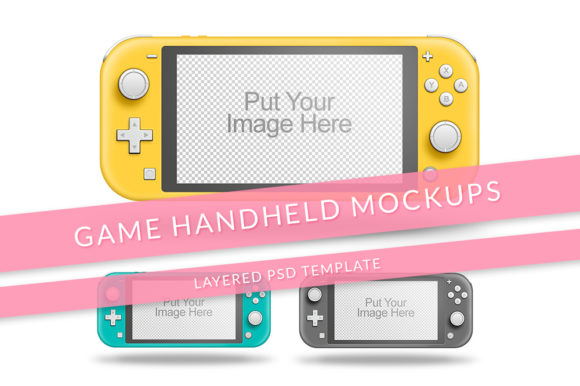
A standard Game Console Nintendo Switch Lite Mockup file, typically delivered as a layered PSD, comes with specific technical foundations. The 72 dpi and RGB color mode are optimized for digital screen use—websites, social media, online advertisements. The minimum resolution of 2200px ensures the image remains crisp when viewed on high-resolution displays or when cropped for specific details. These specs align directly with the needs of digital content creation.
The layered structure is where the practical magic happens. Each component of the console—the screen, the body, the buttons, the background—is separated. This allows for precise editing. The instruction to "replace image in the smart object" refers to a common feature in these mockups where the screen area is a designated smart object layer. Double-clicking it opens a separate file where you can place your own screenshot, game UI, or promotional artwork. Upon saving, it automatically updates within the main mockup, perfectly fitted to the screen's perspective and size.
Visual Customization Through Layer Management
The ability to "show hide several layer to change color option and style" speaks to another powerful feature. Manufacturers and designers often release the Switch Lite in various color editions. A comprehensive mockup will include layers for each official color variant—perhaps Coral, Turquoise, Yellow, or Gray. By simply hiding one color layer and showing another, you can instantly change the console's body color in the mockup. Similarly, layers for different styles, like with or without a texture, a glossy or matte finish, or even hypothetical custom designs, can be toggled. This allows a single mockup file to generate dozens of visual variations without manually repainting or recoloring the object each time.
For a business owner selling console decals, this means producing a gallery of images showing their product on every possible Lite color in minutes. An educator creating a tutorial about mobile gaming interfaces can show the same app on different consoles to highlight consistency. The efficiency gain is substantial.
Key User Groups and Their Distinct Applications
The utility of a Popular game Console Mock-Up extends across a surprisingly broad audience, each applying it to solve different problems.
- Product Designers and Accessory Manufacturers: This group uses the mockup as a critical proof-of-concept tool. Before physically producing a new grip, case, or stand, they can superimpose a 3D model or design flat onto the mockup to visualize fit and aesthetics. It reduces prototyping costs and aids in client presentations.
- Marketing Professionals and E-commerce Managers: For them, the mockup is the cornerstone of asset generation. It creates consistent, high-quality visuals for website product pages, Amazon listings, social media campaigns, and email newsletters. Showing the accessory or game actually on the device, rather than just beside it, builds a stronger psychological connection with the consumer.
- Game Developers and UI/UX Designers: Especially for indie developers, a Switch Lite mockup provides an authentic frame for their game screenshots and trailer stills. It contextualizes the gameplay, immediately signaling to potential players and platform curators that the game is designed for or compatible with that specific hardware. It lends professionalism to their pitch.
- Content Creators and Hobbyists: YouTube reviewers, bloggers, and enthusiasts use these mockups to create compelling graphics for their articles and video thumbnails. A well-composed mockup image can make a tutorial on "How to Install a Switch Lite Screen Protector" much clearer and more engaging than text alone.
- Educators and Researchers: In studies or courses about gaming technology, industrial design, or consumer electronics, authentic mockups serve as accurate visual references in presentations and papers, helping to illustrate specific design features or ergonomic considerations.
Advantages Over Generic Photography or Basic Graphics
Why invest time in learning to use a layered mockup instead of just taking a photo of a real console or using a simple stock image? The advantages are multifaceted and impact both quality and process.
First is control and consistency. With a real photograph, lighting, shadows, and angles change. A mockup provides a perfectly uniform base. Every product image you create for your catalog will have the console at the identical angle, with identical lighting, creating a professional, cohesive brand look. Second is speed and scalability. Changing colors or screen content via layers is instantaneous. Producing 50 variants for an international campaign with different game art takes hours, not days. Third is accessibility. Not every designer or small business owner has a physical Switch Lite in every color at their disposal, ready for a perfect photo shoot. A mockup democratizes high-quality presentation.
Furthermore, using a specialized Nintendo Switch Lite Mockup demonstrates a nuanced understanding of the product ecosystem. It shows attention to detail—the correct proportions, the specific button layout, the exact bezel size around the screen. This accuracy builds trust with an informed audience who can spot an inaccurate or generic representation.
Real-World Implementation in a Project Workflow
Consider a practical scenario: a company launching a new protective carrying case for the Switch Lite. Their workflow might integrate the mockup at several stages.
In the design phase, the case's 2D pattern is placed onto the console body layer in the mockup to check visual appeal. In the pre-production marketing phase, the finalized case design is composited onto the mockup. Using the layer toggles, they generate four images, each showing the case on a Coral, Turquoise, Yellow, and Gray Lite. They also use the smart object to place a generic "Gameplay" screenshot on the screen, suggesting the case in use. For the launch campaign, they create specific assets: for a Facebook ad targeting Animal Crossing players, they open the smart object and replace the generic screenshot with a vibrant Animal Crossing scene. The ad now shows the case on a Turquoise Lite with the game running, creating a highly targeted and appealing visual.
This workflow highlights the mockup's role as a dynamic, central asset, not a one-time-use graphic.
Important Considerations When Selecting and Using a Mockup
Not all mockups are created equal. When sourcing a Game Console Mock-Up, several factors should be evaluated to ensure it meets professional needs.
- Layer Organization and Labeling: A well-organized PSD with clearly named layers (e.g., "Body_Coral", "Body_Gray", "Screen_SmartObject") saves immense time and reduces errors. Poorly organized files can make the simple task of changing a color frustrating.
- Authenticity and Detail: The mockup should be based on accurate 3D models or high-fidelity photography. Details like the correct curvature of the corners, the subtle texture of the plastic, and the precise placement of ventilation grills contribute to its credibility.
- Flexibility of the Smart Object: The screen smart object should be correctly distorted to match the perspective of the console angle. It should also be of high enough resolution that when you insert your 2200px-wide game screenshot, it remains sharp.
- Background Options: Many mockups include multiple background layers—a clean white, a desk environment, a gradient. This allows tailoring the context to your brand's style without needing separate photoshop skills to create a new background.
Finally, ethical and legal consideration is crucial. Ensure the mockup is purchased from a reputable source or is explicitly licensed for commercial use if you are using it to market and sell products. Using a mockup without proper licensing for commercial gain can lead to intellectual property issues.
The evolution of these tools reflects a broader trend in digital product presentation: the move from static, generic imagery to dynamic, context-specific, and highly customizable visuals. For anyone involved in bringing a product related to the Nintendo Switch Lite to an audience, mastering the use of a dedicated, layered mockup is a step that merges technical skill with strategic marketing, ultimately creating clearer communication and a more compelling customer journey.