Crafting Identity: Unleashing the Gamer Boy Mascot Logo
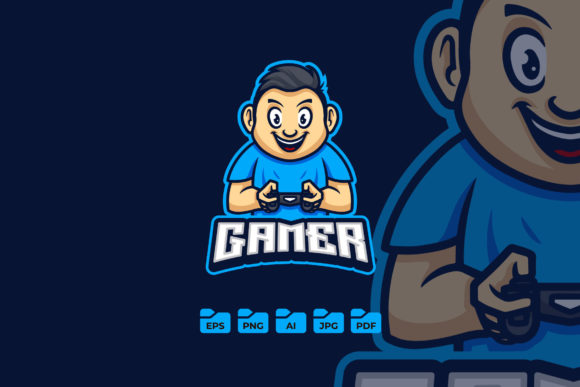
A logo is a promise. It’s the face of your brand, your channel, your team, or your creative project. For anyone operating in the dynamic worlds of gaming, streaming, or digital content, this identity needs to be charismatic, memorable, and instantly resonant. A Gamer Boy mascot logo design serves as that powerful central character, an emblematic figure that embodies energy, skill, and community. More than just a static image, it’s a versatile creative asset designed to be adapted, personalized, and scaled across every platform and medium.
The Core of a Versatile Creative Asset
What makes a Gamer Boy mascot logo design particularly interesting is its foundational flexibility. This isn’t a one-size-fits-all sticker; it’s a professional-grade vector system. The key features—editable text, editable colors, separated layers, and scalability—mean the design is a starting point, not a final destination. You begin with a strong, high-quality character illustration, but you own the ability to change its colors to match your brand palette, modify the text to reflect your name or tag, and adjust elements because every component is on its own layer. This transforms a logo from a borrowed image into your authentic signature.
Consider the practical implication: the included file formats (AI, EPS, PDF, JPG, PNG) ensure you have the right tool for every job. Use the vector files (AI, EPS) for professional print on merchandise like jerseys or posters. Use the high-resolution PNGs for crisp digital use on your stream overlay, website, or social media banners. The Readme.txt file provides the crucial first step—installing the correct font so your text edits are seamless and consistent. This structured approach respects the creative process, ensuring the final result is clean, effective, and organized.
Creative Applications Across Audiences
The applications for this design are as varied as the community it serves. Its core appeal lies in its adaptability for different goals and contexts.
For the Individual Streamer or Content Creator
Personal branding is paramount. A streamer can take the mascot, adjust the colors to complement their channel’s theme, and edit the text to feature their handle. The separated layers allow for adding personal flair—perhaps integrating a favorite game’s color scheme into the mascot’s attire or modifying a detail. This creates a unique logo for YouTube avatars, Twitch panels, and intro screens that feels personally crafted, not generically downloaded.
For Esports Teams and Gaming Communities
Here, the logo becomes a symbol of collective identity. The editable colors are vital for aligning with team uniforms and official branding. The scalable vector files guarantee the logo remains sharp and professional on everything from website headers to large format tournament banners. A team can use the mascot as the central emblem, fostering a sense of unity and recognizable presence in a crowded competitive space.
For Entrepreneurs and Small Business Owners in Gaming
Whether running a local gaming cafe, an online merch store, or a coaching service, a strong visual identity builds trust. The Gamer Boy mascot logo design offers a ready-made, audience-friendly character that speaks directly to the customer base. It can be easily adapted for business cards, store signage, and product labels, providing a consistent and original look that establishes brand legitimacy without the cost of custom illustration from scratch.
Exploring Creative Directions and Variations
The true creative work begins after opening the files. With editable elements, the design invites interpretation. Think about style: by altering color palettes, you can shift the mascot’s mood. A bold, high-contrast scheme feels energetic and competitive, suitable for an esports focus. A softer, more limited palette might feel approachable and community-oriented, perfect for a hobbyist group or educator’s resource.
Practical inspiration can come from platform requirements. For instance, consider creating variations: a full-color version for primary branding, a single-color outline version for watermark use on videos, and a simplified, text-only version derived from the editable text layer for smaller icons. This organized approach to variation ensures consistency across all touchpoints.
Don’t overlook the power of context. The same mascot logo, when placed on a stark, dark background for a stream overlay, communicates intensity. When used on a bright, playful background for a community Discord server, it communicates inclusivity. The design’s high-quality rendering ensures it remains effective in both scenarios.
Balancing Originality with Recognizable Appeal
A common challenge is making a template asset feel original. The key is in the thoughtful edits. Change the accent colors to ones not typically seen in gaming logos—perhaps deep purples and teals instead of neon reds and blues. Use the editable text to employ a clever, personal tagline beneath your name. Combine the mascot with other simple graphical elements from your project using the separated layers. These actions ground the logo in your specific vision while leveraging the professional foundation of the mascot illustration.
From Download to Deployment: A Practical Pathway
To achieve the best results, follow a logical workflow. First, read the Readme.txt and install the font. This ensures all text edits are typographically consistent. Next, open the vector file (AI or EPS) in your preferred editing software. Begin with global changes: adjust the primary color scheme using the editable color layers. Then, focus on the text, inputting your channel, team, or business name. Explore the separated layers to understand the construction; you might hide or subtly modify a secondary detail to suit your taste.
Once your core version is set, export the specific formats you need. Use the PNG for immediate digital use. Save the modified vector files for future scalable projects. This process empowers you to control the asset fully, making it an integral part of your creative toolkit for ongoing projects.
Ultimately, a Gamer Boy mascot logo design is more than a file download. It’s a bridge between a professional visual starting point and your unique creative expression. It provides the structure needed for a clear, effective identity while granting the freedom to adapt, evolve, and own your mark in the gaming world. Whether you’re building a personal brand, fostering a team spirit, or launching a business, this asset offers a practical, inspiring foundation to craft a logo that truly represents you.